
Setup sheet
A restaurant deployment chart that knows who's trained
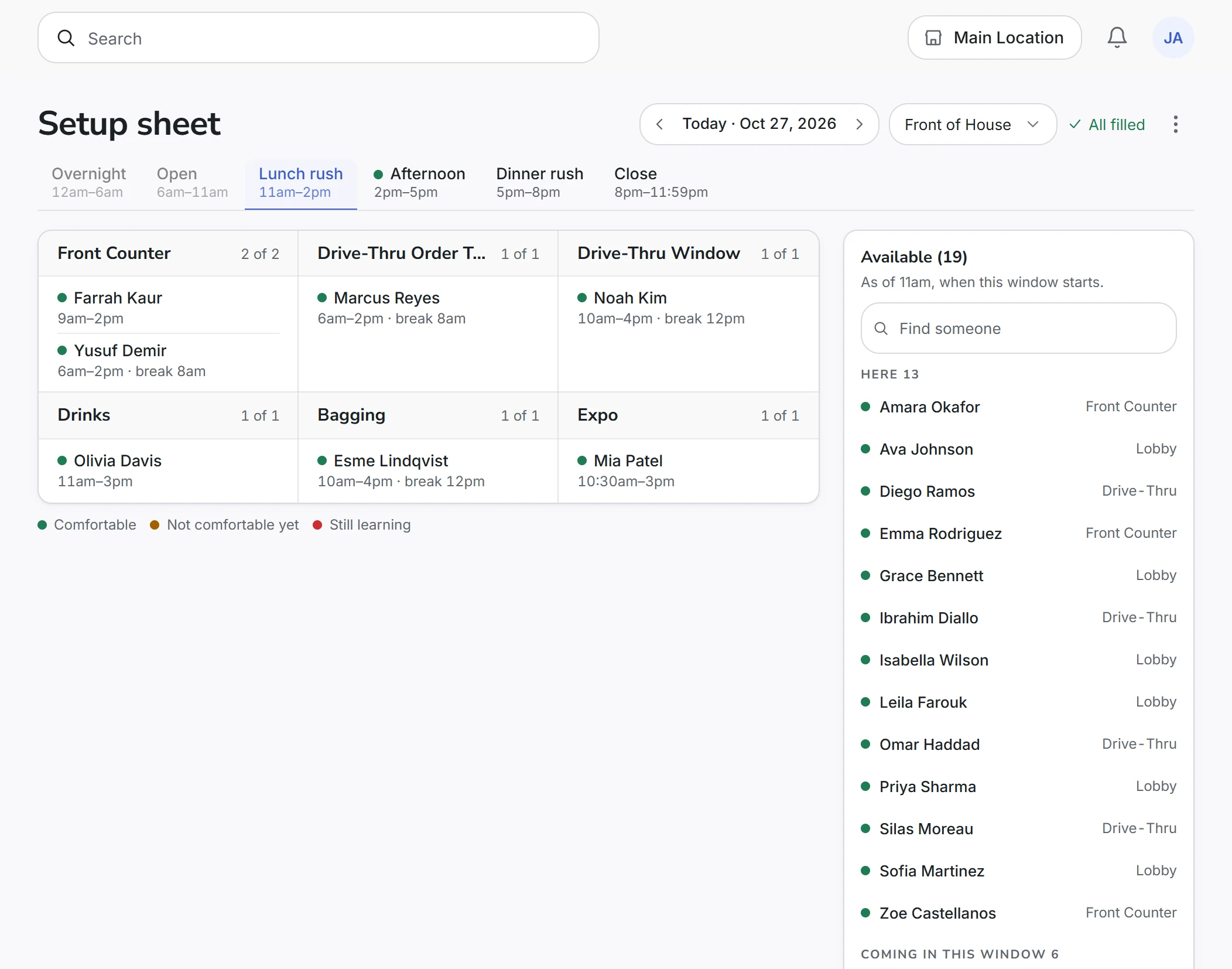
A normal lunch, start to finish
Step 1
Bring in the week
Upload the HotSchedules Extended Schedule Report, or a spreadsheet. The sheet now knows who is in, and from when to when.
Step 2
Open Lunch rush
Each part of the day has its own page with your stations on it. You decide how many spots each one gets.
Step 3
Put your regulars where they go
Drag the people you always place onto their spots. Fill won't overwrite those.
Step 4
Fill the rest
Fill empty spots uses whoever is left and signed off on each station. Anything it can't fill stays blank, the same as on paper.
Step 5
Print it
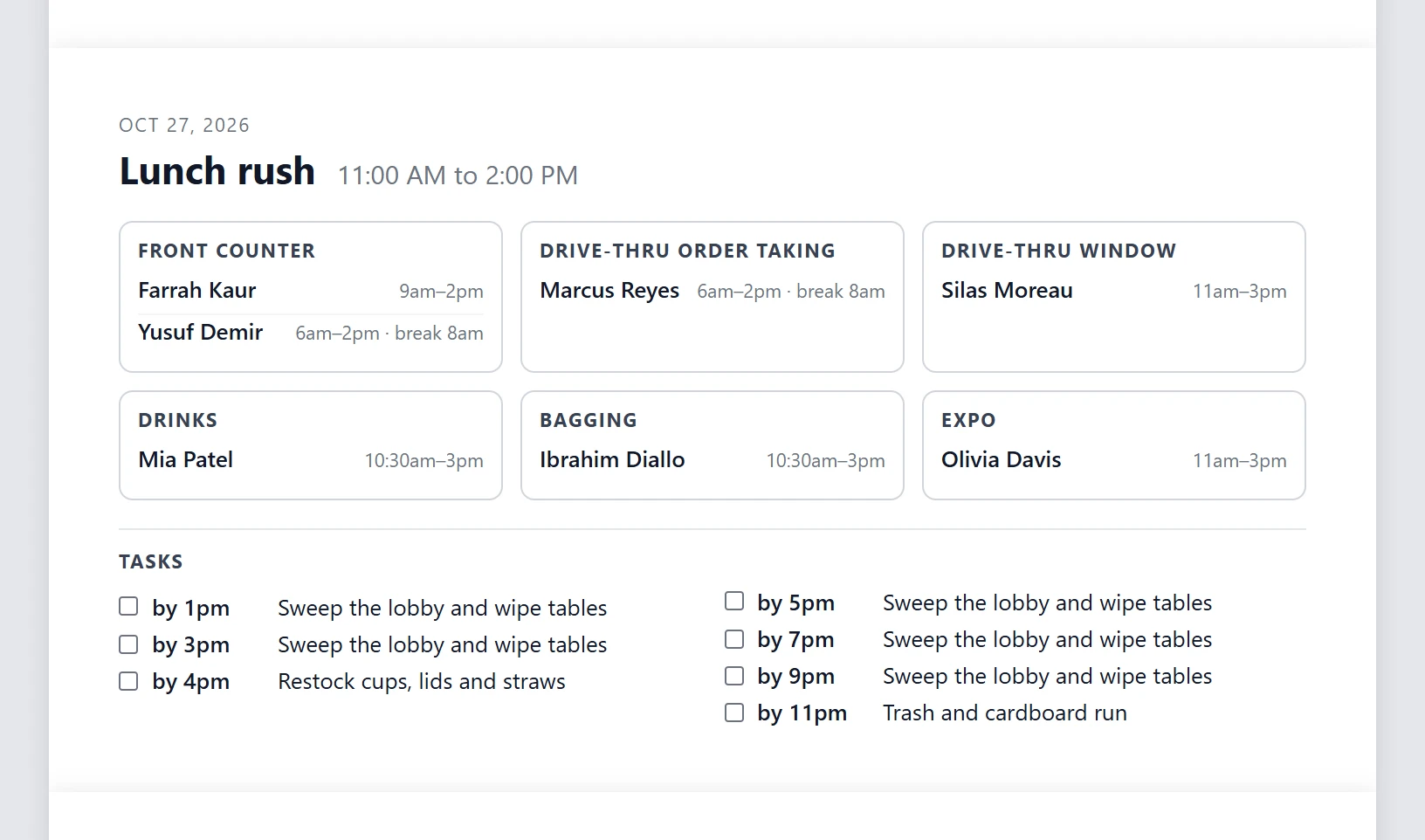
One page for each part of the day, with names, hours, breaks and the tasks list. Or leave it open on the office tablet.
When someone leaves at one
Someone on Front Counter is scheduled until one. A little before they go, a small note shows up on the sheet with how many minutes they have left. Tap Replace for the best free person, or Choose someone else to see everyone who could stand there, best fit first, with their hours, their comfort level and when they arrive if they aren't in yet.
Pick someone and, before you confirm, it tells you in one line who takes the spot and who comes off it. Nothing else on the sheet moves unless you move it. There are no red alerts and no gap counts.
Getting your crew onto it
Fill only uses people marked Comfortable on a station, and on day one nobody is marked. So that comes first. On the Team Members page, choose Bulk edit, tick everyone who already runs Drive-Thru Window, choose Set comfortability, and pick that station. Do the same for each station you staff. People you aren't sure about stay unmarked until a trainer watches them.
From then on, trainers score people on shift against your own station checklists. When someone scores under your passing bar, the evaluation suggests marking them down on that station, and the trainer decides. The cross-training matrix shows the same marks across the whole crew.
It picks up your habits, slowly
Say you keep moving the same closer onto iPOS on Tuesday nights. Once Fill has seen that change on at least three days, it uses the habit to choose between people who are already signed off. Only changes made during the shift count, and if a day went sideways, you can tell it not to learn from that day.
Trainees, breaks and side work
Put a trainee on the same line as their coach so both names are on the sheet and the shift lead can see the pairing. Breaks sit next to each name, and you can change one from the spot. Side work goes on a tasks card with a time for each. You assign tasks yourself and tick them off when they're done.
What the crew sees
The crew doesn't need an account or the app. Print the sheet and pin it up. This is the lunch page from the demo store, as it comes off the printer.
Common questions
Does CrewSharp replace my scheduling software?
No. Who works Tuesday and for how long stays in HotSchedules, 7shifts or whatever you use. CrewSharp reads that schedule and gives you the sheet for each part of the day. It does no labor forecasting and has no time clock.
Will it put someone untrained on a station?
Fill won't. It only places people marked Comfortable on that station, and it never overwrites a spot you filled by hand. You can still put anyone anywhere yourself. The picker shows each person's comfort level next to their name, so you know what you're choosing.
What does Comfortable mean, and who decides it?
Comfortable means a trainer or manager has signed that person off on that station. Not comfortable yet and Still learning mean they haven't been, and Fill skips them for that station. You set the marks by hand to start, and evaluations on shift keep them current.
Do my crew need accounts or phones to see it?
No. Managers and shift leads work the sheet. Print it, one part of the day per page, and put it where the crew already look.
What happens when the schedule changes?
Import the new report. It updates who is working each day and matches people to the roster you already have, so their training history stays with them. Spots you've already set on a day's sheet stay where they are. For a single change on the day, swap the person on the sheet.
What does it cost?
$79 a month per store, with unlimited users. The setup sheet is included, along with every other part of CrewSharp. The trial is 30 days and doesn't need a card.
Run one lunch on it
Import next week, mark who runs what, then place, fill and print Tuesday's lunch. $79 a month per store, with unlimited users.
30 days free. No card to start. Cancel in one click.
Keep reading
For HotSchedules users
Import the Extended Schedule Report and the sheet knows who's in.
Cross-training matrix
Who is signed off on what, across the whole crew.
Free deployment chart template
Rather start on paper? Print this one, with a signed-off column.
Pricing
One price per store. Every user and every feature included.