
Restaurant training software
Training software that measures the floor, not a classroom
The problem is not that training does not happen
It happens constantly. Somebody shows the new hire the fryer on a Tuesday, somebody else walks them through closing on a Thursday, and by Saturday three people have a partial answer to whether that person is ready. None of it is written down anywhere you can query at 4pm on a Friday when someone calls out.
So readiness ends up living in one manager's head. That works right up until their day off, a transfer, or a resignation, and then the floor guesses. CrewSharp exists to move that knowledge out of one person's memory and into a record the whole management team can read.
What you get
Checklists that produce a score
Every job carries its own checklists, fully editable. Mark items critical, group them into categories, choose the answer type, and set what affects the score. A trainer runs it on a tablet against a real person on a real shift, and the result is a number plus notes instead of a vibe.
A live read on who needs attention
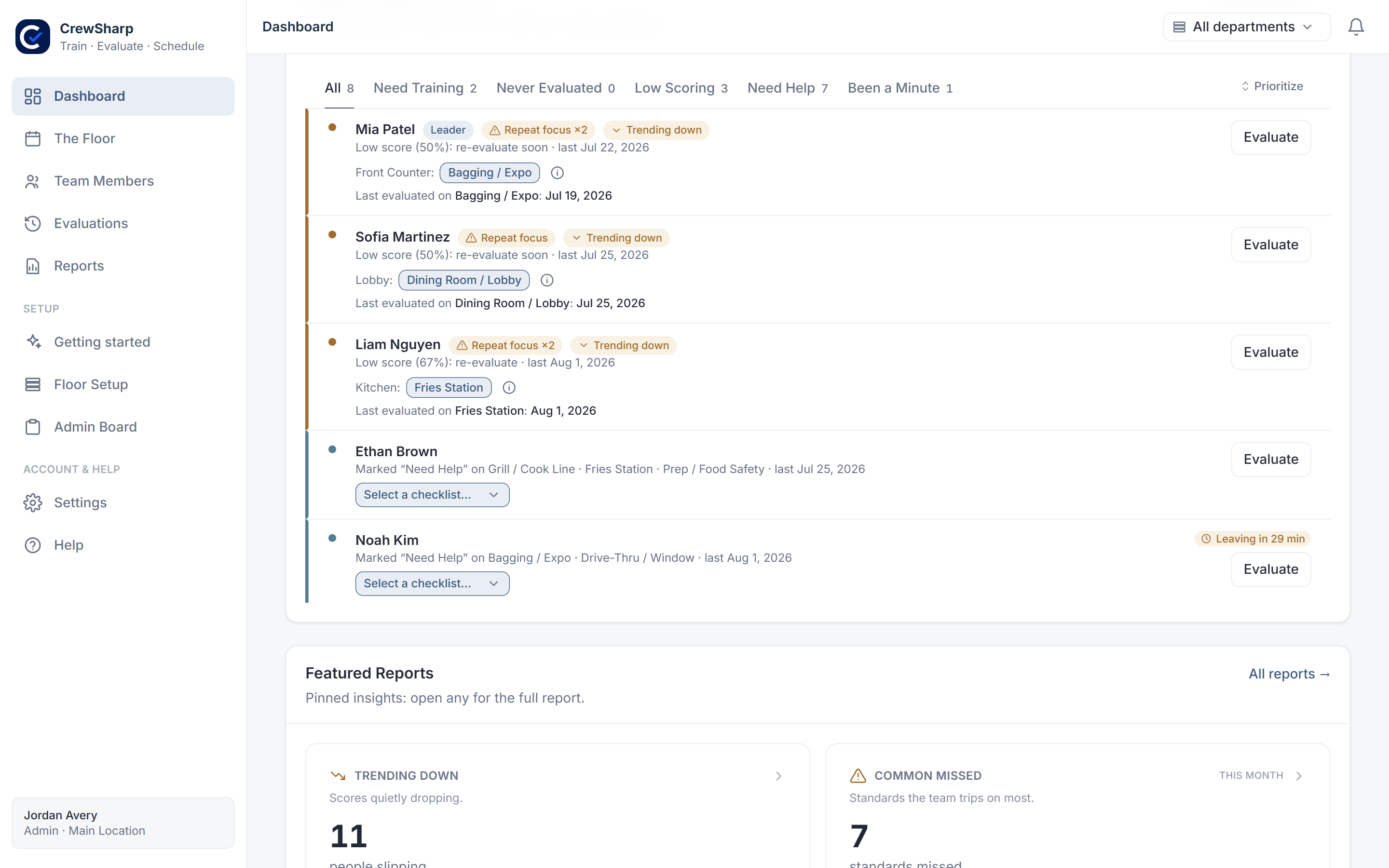
The dashboard opens on the people clocked in right now, ranked by urgency: low score, repeat miss on the same item, never evaluated, and not evaluated in a while are each their own tab with a live count. Hit Evaluate on a row and the right checklist is already selected.
A cross-training map of the whole roster
Every person against every checklist, kept current automatically as evaluations land. It is how you find the position only two people can run before that becomes a scheduling emergency. See the cross-training matrix in detail.
Reports a district manager will open
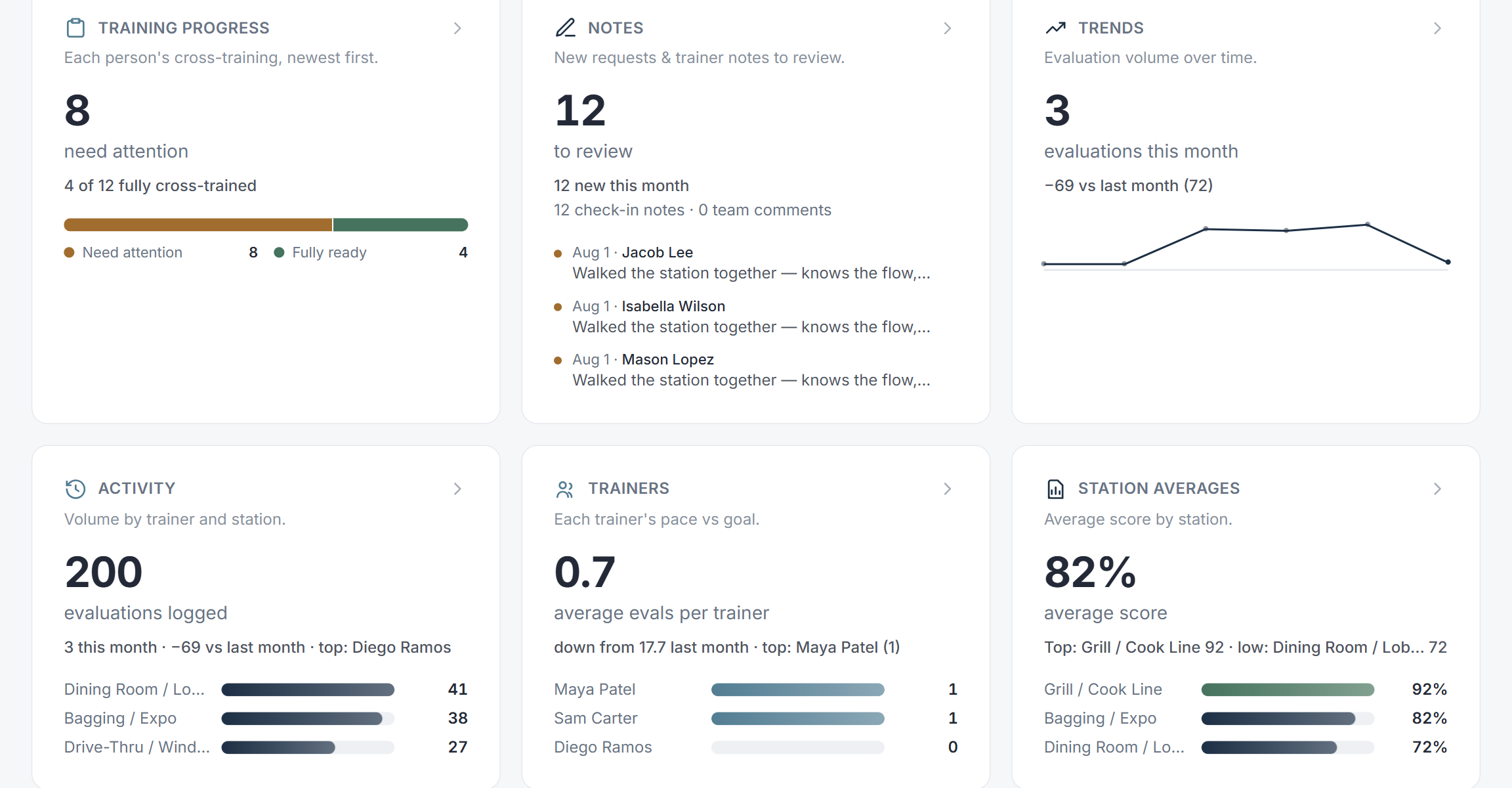
Checklist averages, the items your crew misses most, critical misses, score trends over time, and who is doing the training. Open any card for the full report and switch it to all time.
A setup sheet that knows who's trained
Because it knows who is signed off on what, the setup sheet for each part of the day can fill its own open spots with people who can actually run them. You still place whoever you want by hand. More on the restaurant setup sheet.
What CrewSharp deliberately is not
It is not a course platform. There is no video hosting, no SCORM, no quiz builder. If you need to deliver and document a food-handler certification, keep the tool that does that.
It is not a scheduling system either. It reads your schedule and plans who stands where inside it; it does not replace HotSchedules or 7shifts. If HotSchedules is what you run, the import path is built for you.
What it does instead is the part those tools leave empty: a current, per-checklist, per-person answer to "can they do this yet".
Who it fits
- Single-unit owner-operators who are the training program and want it to survive their day off
- Fast-casual and quick-service GMs staffing a line where the wrong body in the wrong position costs the whole rush
- Training and ops managers across a handful of stores who need one standard, not five
- Franchisees who have to prove consistency across locations without flying to each one
Common questions
What is restaurant training software?
Restaurant training software records what each employee has been trained on and how well they are doing it, so readiness is a record instead of a manager's memory. CrewSharp is the operational kind rather than the classroom kind: instead of hosting video courses, it turns your checklists into scored evaluations a trainer runs on the floor, and rolls the results up into who is signed off on what.
How is this different from a restaurant LMS?
An LMS teaches and quizzes. It is good at food-safety modules and policy sign-offs, and it tells you someone watched a video. It does not tell you whether they can run the fryer on a Saturday. CrewSharp measures the second thing: a trainer scores the person against the real checklist, in position, during a shift. Plenty of operators run both.
How long does it take to set up?
An afternoon. Import your roster from a spreadsheet or a HotSchedules Extended Schedule Report, pick a starter pack of jobs and checklists for your kind of business, and start evaluating the same day. There is no implementation call and nothing to install.
Do trainers need their own accounts?
Yes, and they are free. Team members, trainers and evaluations are all unlimited on the one plan. Roles and permissions control who can evaluate, who can see scores, and who can change checklists.
Does it work on a tablet?
That is what it is built for. CrewSharp runs in any browser and the evaluation flow is tap-first, so the tablet already on your line works. It is also fine on a phone or a laptop, and it installs to a home screen if you want it to feel like an app.
What does restaurant training software cost?
CrewSharp is $79 per store, per month, with every feature included and no per-seat charge. Most tools in this category price per employee, which punishes you at exactly the moment you hire. There is a 30-day free trial and no card is required to start.
See it against your own checklists
Import your roster, pick a starter pack, run a few evaluations. You will know within an afternoon whether the picture it gives you is the one you have been missing.
30 days free. No card to start. Cancel in one click.
Keep reading
Restaurant cross-training matrix
Every person against every checklist, updated as evaluations happen.
Training checklists
How a paper checklist becomes a scored, trackable evaluation.
How to build a restaurant training program
The step-by-step version, whether or not you use software for it.
Pricing
One plan, $79 per store per month, everything included.